IO Device Redundancy Feature Description
Canvas supports a redundancy feature for Ethernet-based I/O devices, allowing a project to maintain a stable connection to a PLC even if the primary connection is lost. When redundancy is enabled, users configure a Primary PLC and a Secondary PLC. Under normal conditions, the Primary PLC is used for communication. If a problem occurs with the Primary PLC's connection, the system automatically switches to the Secondary PLC to keep tag data flowing, then switches back once the Primary PLC's connection is restored.
This feature is useful for projects where continuous communication with a PLC is critical, and a backup connection should take over automatically if the primary connection fails.
Enabling Redundancy
To enable this feature, open the I/O Device Editor by clicking Tools > I/O Device Editor, select an Ethernet-based device, and check the Redundancy Enable checkbox under the Ethernet section.
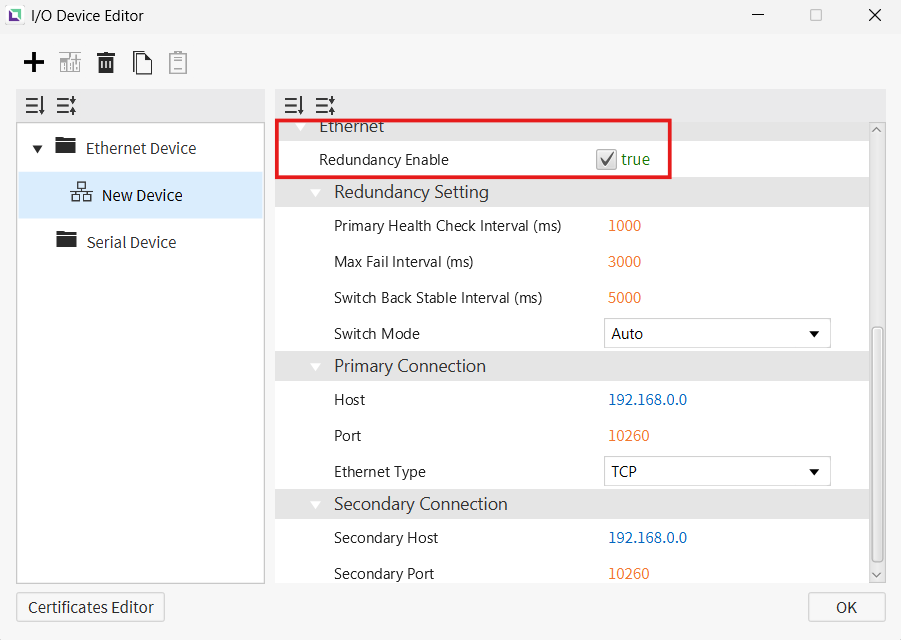
Once enabled, users can configure the connection settings for both the Primary and Secondary PLC.
Operation Modes
The redundancy feature can run in one of two modes:
- Automatic Operation — The system automatically switches between the Primary and Secondary PLC based on their connection status, without requiring any user action.
- Manual Operation — Switching between the Primary and Secondary PLC is instead controlled using scripts, giving users direct control over which PLC is active.
Automatic Operation
In Automatic Operation, the Primary PLC is always given priority when both PLCs are connected. If the Primary PLC's connection is lost, the system switches to the Secondary PLC so communication can continue uninterrupted. Once the Primary PLC's connection is restored and remains stable, the system automatically switches back to the Primary PLC.
If both PLCs lose connection at the same time, the system treats this as a disconnection and continues attempting to reconnect to the Primary PLC.
Manual Operation
In Manual Operation, switching between the Primary and Secondary PLC only occurs when a script command is executed. If both PLCs lose connection, or if a connection is restored, the currently active PLC remains unchanged unless a script command is run to switch it.