Siemens S7 Introduction
Siemens S7
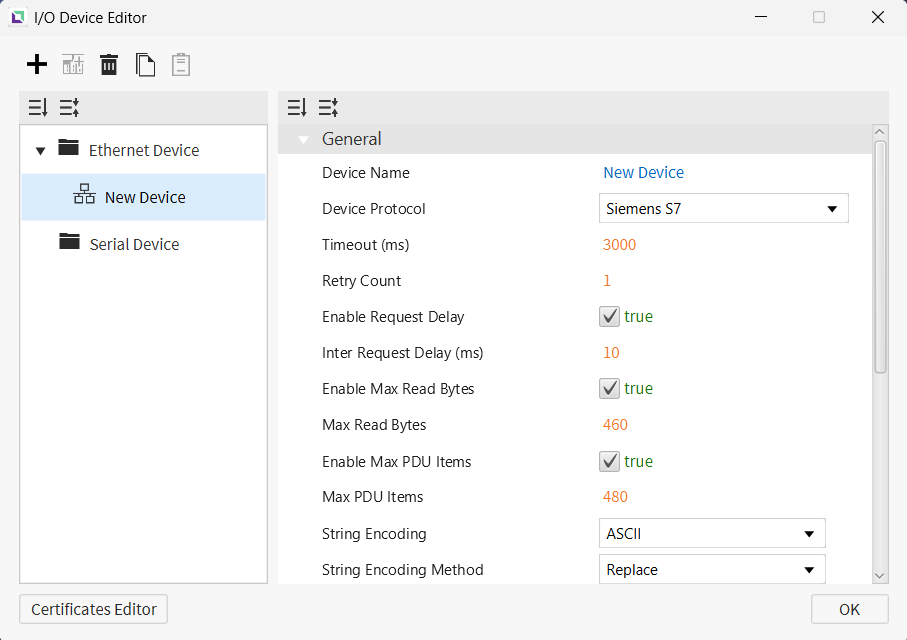
Canvas supports Siemens S7 as a way to connect to devices that support this protocol. Users can set up the Slot Number and Rack Number of the S7. This will need to be correct to grab information from the correct device. Users can also configure request timing and data transfer settings for the connection, including the delay before sending a request, the maximum number of bytes retrieved per read, and the PLC's PDU size.
LOGO! 0BAx Series
Memory Area and Ranges
| Memory Area | Symbol | Digital | Analog | Address Number System | Access |
|---|---|---|---|---|---|
| Process Inputs | I | I1 - I64 | - | Decimal | R |
| Process Outputs | Q | Q1 - Q64 | - | Decimal | R/W |
| Markers | M | M1 - M112 | - | Decimal | R/W |
| Variables | V | V0.0 - V14697.7 | V0 - V14697 | Decimal | R/W |
| Analog Inputs | AI | AI1.0 - AI16.15 | AI1 - AI16 | Decimal | R |
| Analog Outputs | AQ | AQ1.0 - AQ16.15 | AQ1 - AQ16 | Decimal | R/W |
| Analog Makers | AM | AM1.0 - AM64.15 | AM1 - AM64 | Decimal | R/W |
| Function | F | F1 - F4 | - | Decimal | R/W |
| Cursor | C | C1 - C4 | - | Decimal | R/W |
S7 Series
Memory Area and Ranges
| Memory Area | Symbol | Digital | Analog | Address Number System | Access | Note |
|---|---|---|---|---|---|---|
| Process Inputs | I | I0.0 - I1023.7 (Max 65535.7) | I0 - I1023 (Max 65535) | Decimal | R | - |
| Process Outputs | Q | Q0.0 - Q1023.7 (Max 65535.7) | Q0 - Q1023 (Max 65535) | Decimal | R/W | - |
| Markers | M | M0.0 - M4095.7 (Max 65535.7) | M0 - M4095 (Max 65535) | Decimal | R/W | - |
| DB | DB | DB0,0.0 - DB65535,65535.7 | DB0,0 - DB65535,65535 | Decimal | R/W | Range varies depending on PLC program |
| Counters | C | - | C0 - C65535 | Decimal | R/W | - |
| Timer | T | - | T0 - T65535 | Decimal | R/W | - |
Notes
- S7 1200/1500 notes:
- Only global DBs can be accessed.
- To access a DB memory area in S7 1200/1500, some additional settings in PLC software (TIA Portal) are required.
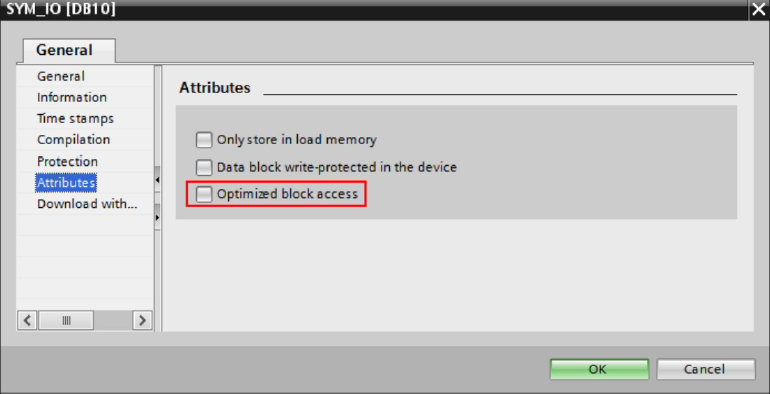
- The optimized block access must be turned off.
- Select the DB in the left pane under “Program blocks” and press [Alt+Enter]. (Or in the contextual menu, select “Properties…”)
- Uncheck Optimized block access
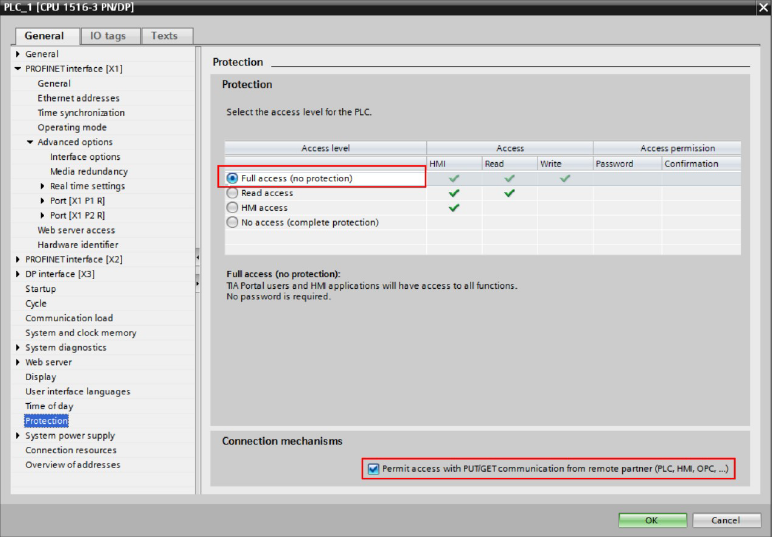
- The access level must be “full,” and the “connection mechanism” must allow GET/PUT.
- Select the CPU project in the left pane and press [Alt+Enter]. (Or in the contextual menu, select “Properties…”.)
- Select “Full access” and check “Permit access with PUT/GET …” as in the image below.