Tag Registration Description
Tag Registration controls how and when Canvas Runtime requests tag updates from the Gateway. Prior to version v5.0.0, the Gateway automatically registered every tag at startup. In v5.0.0 and later, Canvas introduced dynamic tag registration, allowing the Gateway to only register tags that Runtime actively uses. This improves performance and reduces unnecessary communication, but it also means that unreferenced tags will not register automatically.
Understanding this behavior is important when working with external devices such as PLCs and Modbus equipment.
What Is Dynamic Tag Registration?
In Canvas v5.0.0 and newer, the Gateway no longer registers every tag at startup. Instead:
- The Gateway initializes and waits for registration requests.
- Canvas Runtime registers only the tags that it actively needs, which occur when:
- A tag is bound to a GUI object displayed on an active page.
- A tag is read or written using
tag.read()ortag.write()in a script.
If a tag is not used by any object, script, or utility function, Canvas Runtime will not ask the Gateway to register it, meaning the Gateway will never read or write that tag from the external device.
Real-World Behavior and Symptoms
The project contains four Modbus I/O tags, but none of them are referenced by any objects or scripts. Because Runtime never accesses them, the Gateway does not register the tags or update their values.
This results in the following behaviors:
- Modbus communication appears inactive.
- Tag values remain at their initial defaults and never update.
- Communication only works when:
- The PLC boots before the HMI, and
- The Gateway performs its initial reads before Runtime connects.
If the PLC is online during startup, some initial values may appear, but updates stop once Runtime deregisters the unused tags.
If the PLC is offline during startup, the tags are never registered at all.
How to Ensure Tags Are Registered
To make Runtime register the tags, one of the following must occur:
1. Bind the Tag to a GUI Object
Bind the tag to any UI object (such as a Text Display, Gauge, Slider, or Numeric Display) on a page that is open during Runtime.
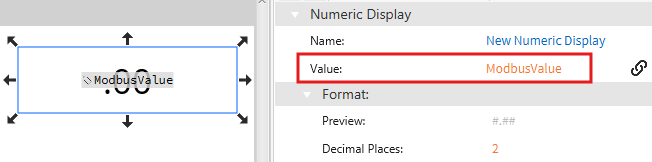
Runtime will then request the Gateway to register the tag.
2. Use the Tag in a Script
Calling the tag’s value inside any script causes registration.
Example:
var value = tag.read("ModbusValue");
tag.write("ModbusValue", 123.45);