Alarm Banner Feature Description
Canvas offers the Alarm Banner object, which displays active alarm messages as scrolling text within a defined area of the page. Unlike the Alarm Summary, which presents alarms in a table, the Alarm Banner provides a compact way to keep alarm information visible. Users can filter the displayed alarms and customize the appearance of messages based on their assigned alarm level.
Alarm Banner Designer Functionalities
Click Insert > Alarm Banner, or click the Insert Alarm Banner icon on the toolbar, and click and drag on the page to bring up the Alarm Banner object as shown below:

Properties
The Alarm Banner object can be customized based on specific properties.
To ensure the property windows are enabled, click View > Properties.
Basic Properties
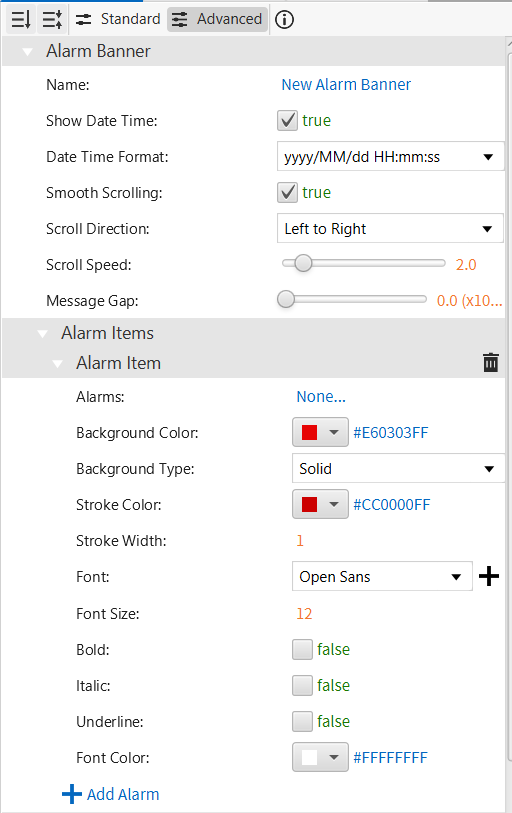
The Basic property allows users to configure the fundamental aspects of the object, including its Name, whether to Show Date Time (and in what Date Time Format), Smooth Scrolling, Scroll Direction, Scroll Speed, and the Message Gap between alarm messages.
Within this section, users can add one or more Alarm Items. Each Alarm Item allows users to select specific alarms to include, then assign that group of alarms a Background Color, Background Type, Stroke Color, Stroke Width, Font, Font Size, and Font Color, along with Bold, Italic, and Underline options.
Appearance
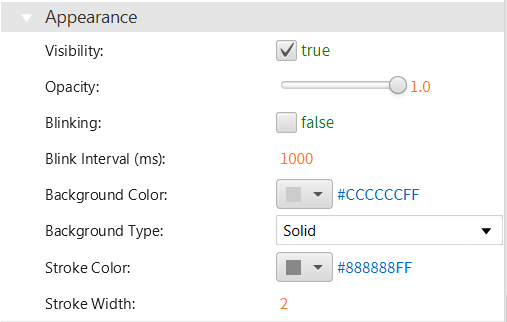
The Appearance section enables the use of selections to alter visible characteristics, including Visibility, Opacity, Blinking, Blink Interval, and the default Background Color, Background Type, Stroke Color, and Stroke Width used when no alarms are active.
Position
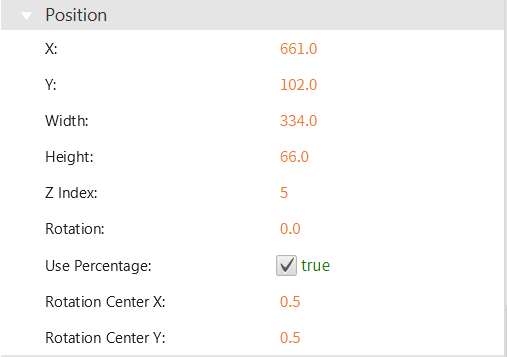
The Position section provides adjustable properties that reshape or move the object, including X, Y, Width, Height, Z Index, Rotation, and Rotation Center.
Actions
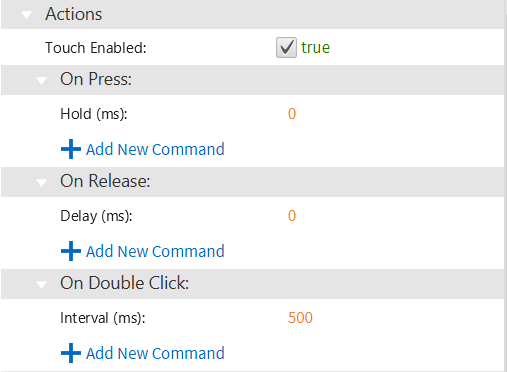
The Actions section allows users to enable touch interaction and assign commands to run On Press, On Release, and On Double Click.
Permissions
Permissions can be assigned to the Alarm Banner object to allow the correct users to interact with it.
